Ouster雷达实现障碍物分类检测
环境准备
操作系统:ubuntu 22.04
安装依赖
安装ouster-sdk
pip install ouster-sdk==0.14.0
安装yolo5:
pip install ultralytics
Demo下载
github地址:https://github.com/ouster-lidar/ouster-yolov5-demo/tree/main
git clone https://github.com/ouster-lidar/ouster-yolov5-demo.gitgit clone https://github.com/ouster-lidar/yolov5-ouster-lidar-data.git
安装依赖
cd ouster-yolov5-demopip install -r requirements.txt
下载数据
cd yolov5-ouster-lidar-datasudo apt install git-lfsgit lfs installgit lfs pullcp -r Ouster-YOLOv5-sample.* ../ouster-yolov5-demo
修改 yolo5_opencv.py(否则运行的时候会报错):
主要修改get_scan_size_and_fps函数:
修改前:
def get_scan_size_and_fps(sensor_info: client.SensorInfo):"""extract the scan width x heigh x fps information from the json file"""w = sensor_info.mode.colsh = len(sensor_info.beam_altitude_angles)fps = sensor_info.mode.frequency
修改后:
def get_scan_size_and_fps(sensor_info: client.SensorInfo):"""extract the scan width x heigh x fps information from the json file"""print(sensor_info)lidar_mode = sensor_info.config.lidar_modew = sensor_info.format.columns_per_frameh = sensor_info.format.pixels_per_columnprint(lidar_mode)#w = sensor_info.mode.cols#h = len(sensor_info.beam_altitude_angles)mode_str = str(lidar_mode).split('.')[-1]fps = int(mode_str.split('x')[-1])print(w, h, fps)return w, h, fps
cv2.imshow对应的行也注释掉(如果用的docker,会无法显示):
#cv2.imshow('Lidar Detection', stacked_images)
变动如下:
ubuntu@708caa27696a:~/ouster/ouster-yolov5-demo$ git diffdiff --git a/yolo5_opencv.py b/yolo5_opencv.pyindex 221841f..7691dad 100644--- a/yolo5_opencv.py+++ b/yolo5_opencv.py@@ -59,9 +59,16 @@ def get_frame_from_scan(scan, channel):def get_scan_size_and_fps(sensor_info: client.SensorInfo):"""extract the scan width x heigh x fps information from the json file"""- w = sensor_info.mode.cols- h = len(sensor_info.beam_altitude_angles)- fps = sensor_info.mode.frequency+ print(sensor_info)+ lidar_mode = sensor_info.config.lidar_mode+ w = sensor_info.format.columns_per_frame+ h = sensor_info.format.pixels_per_column+ print(lidar_mode)+ #w = sensor_info.mode.cols+ #h = len(sensor_info.beam_altitude_angles)+ mode_str = str(lidar_mode).split('.')[-1]+ fps = int(mode_str.split('x')[-1])+ print(w, h, fps)return w, h, fps@@ -107,7 +114,7 @@ def run():stacked_images = cv2.vconcat(images)converted_image = cv2.convertScaleAbs(stacked_images * 255)- cv2.imshow('Lidar Detection', stacked_images)+ #cv2.imshow('Lidar Detection', stacked_images)out.write(converted_image)key = cv2.waitKey(1) & 0xFF
运行:
python3 yolo5_opencv.py
会自动生成output.avi文件,转换成mp4文件:
ffmpeg -i output.avi -c copy output.mp4
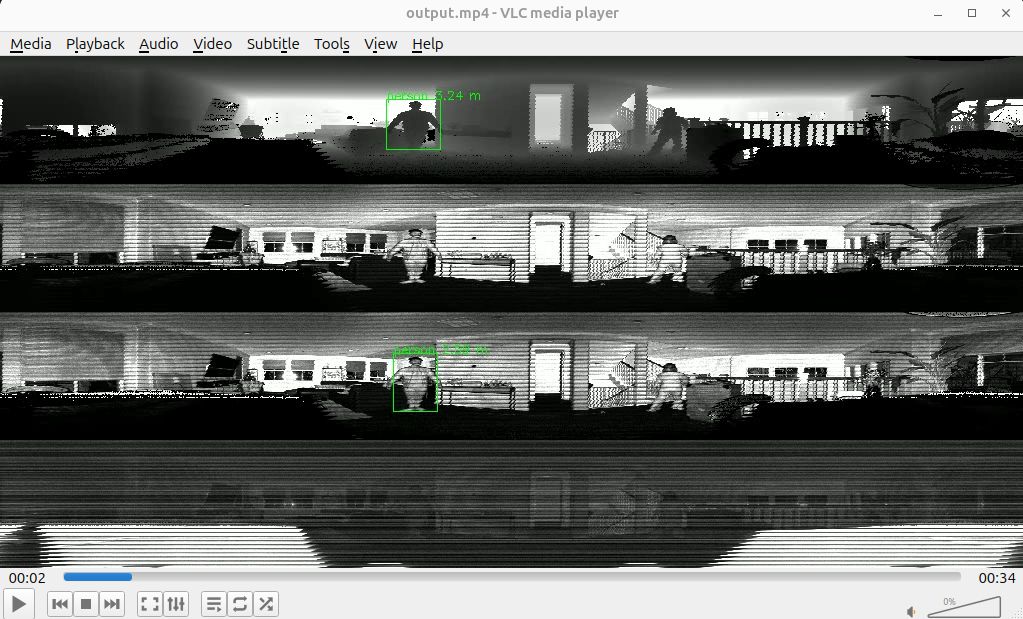
使用vlc播放mp4文件,查看结果:
# sudo apt install vlcvlc output.mp4
参考文章
更多文章可关注公众号